BGCF Fundholder Portal Instructions
Blue Grass Community Foundation is please to offer an online portal for fund administrators and advisors. Available 24 hours a day, this portal provides a convenient and easy way to manage your fund(s).
Using the portal, advisors and administrators can view and download a history of donations made to the fund they manage; view and download a history of grants disbursed from the fund; recommend a new grant or distribution; access monthly fund statements and/or generate a fund statement for a custom date range; or make an online donation to any BGCF fund.
Accessing the Fundholder Portal
- Navigate to the portal login page: https://bgcf.fcsuite.com/erp/portal
- Enter your username (which is your email address by default) and password, and then click Login.
- Once you have successfully logged in, you may update your username or password by clicking PROFILE, then SECURITY.
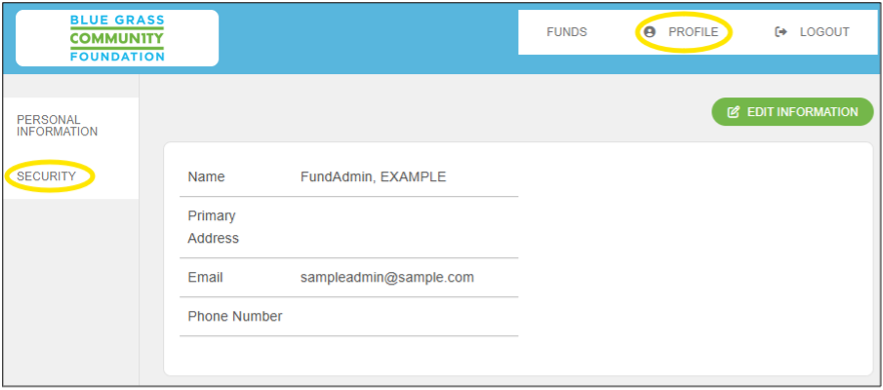
TIP: You may also use the EDIT INFORMATION button to update your contact information. This is the most efficient way to let us know if you’ve moved, or have a new email address or phone number.
Navigating the Fundholder Portal
If you are an advisor or administrator for only one fund, the Funds tab will take you directly to the summary page for that fund. If you serve as advisor or administrator for multiple funds, the Funds tab will allow you to choose among those funds.

From the Fund Summary page, use the menu on the left to navigate to any of the available options.
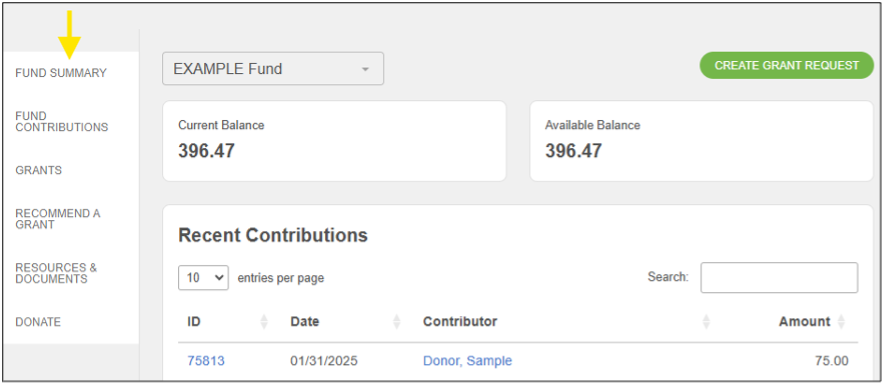
Recommend a Grant
This option is available to those users who have permission to make recommendations or request distributions from the fund. To request a grant or a fund distribution, you may use either of the following methods:
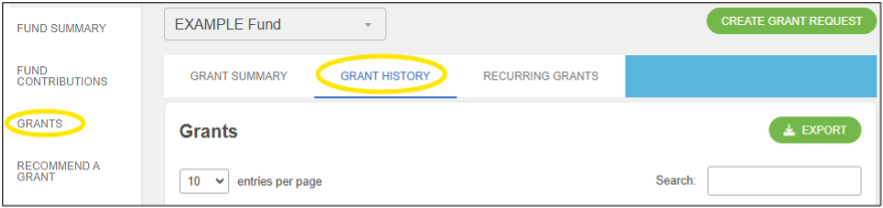
Option 1: To quickly copy a past grant from your grant history, visit the GRANTS page.
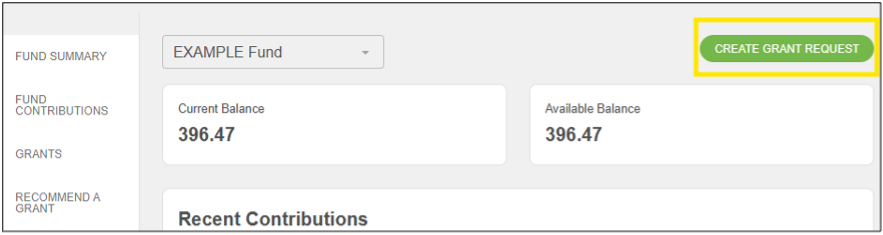
Option 2: Click the CREATE GRANT REQUEST button from the summary page or any grant-related page.
Select the appropriate option for the nonprofit organization you wish to support:
- Previous Grantee: To choose an organization or a BGCF fund you have given to in the past or any fund at BGCF that is available to receive contributions.
- Grantees you have given to in the past: Any organization that has previously received a grant from your fund. Foundation funds you have given to in the past: Any BGCF fund that has previously received a contribution from your fund.
- Other foundation funds: The complete list of BGCF funds that are available to receive contributions from your fund.
- Search Grantee: To search for an organization to which you have not previously granted. Search by name or EIN. Results will show any matching organization already in the Blue Grass Community Foundation grantee database or in the Candid/GuideStar national database of verified nonprofits.
- Manual Grantee: To manually enter the name and contact information for the organization.
After selecting the recipient organization, you will arrive at the grant request form. Enter the applicable information.
- Use the Description field to enter the designation or purpose of the grant (e.g., general support; capital campaign, mission project, etc.)
- By default, the name of the fund, as well as the name and mailing address of the fund advisor, will be included in the grant transmittal letter that accompanies the grant check.
- If you prefer the grant be made completely anonymously, check the Anonymous box.
- If you prefer that the fund name be included in the grant transmittal letter to the grantee, but would like the fund advisor information to be anonymous, do not click the Anonymous option, but rather make mention of this request in the Special Instructions field.
- If you would like to make your grant recurring (for instance $100 each month or $1,000 each year), check the Recurring box. The amount entered will be the amount of the grant for each occurrence. You will be prompted to set a start date, as well as the interval. You also have 0the option to set the number of recurring grants or you can leave this field blank, which will leave the grants to recur indefinitely until you contact BGCF to stop them.
- Optional: you may upload an Attachment if this is helpful in relaying additional information about the grant you are recommending.
- Use the Special Instructions field to include any additional information regarding this grant. For instance, if the grant you are recommending is in honor or memory of someone, you would include this information here.
Once the recommendation form is complete, click the Review button to review your request, and then click Submit to submit your recommendation.
The RECOMMEND A GRANT / MOST RECENT GRANTS section includes grants that have been recently recommended from the fund. Recommendations still in the “Request” status can be canceled by clicking the CANCEL button to the right of the request.
Manage Recurring Grants
If you have a recurring (monthly, quarterly, annual) grant, you can edit or cancel it from the GRANTS page.

Generate a Custom Fund Statement
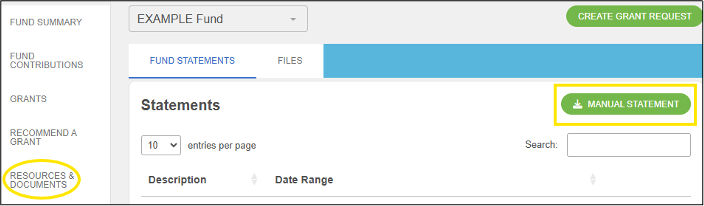
You can find monthly fund statements and other fund documents in the RESOURCES & DOCUMENTS section of the menu on the left.
If you wish to generate a fund statement for a custom date range, click the MANUAL STATEMENT button. Please note that the date range you select may be an open period. The generated information will be complete only through the most recently posted fund statement date.
Donate to Your Donor Advised Fund (or any fund at BGCF)
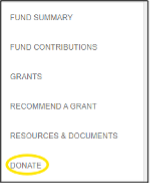
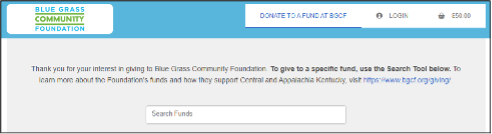
You can donate by credit card or ACH directly from the portal. Click DONATE in the menu on the left and follow the prompts.
Need Help Logging In?
If you do not have your username and/or password for the Fundholder Portal, click “Forgot your password?” under the LOGIN button. Enter your username (which will be your email address by default), click SEND EMAIL, and you will receive an email with instructions to reset your password. If you do not receive an email, please call us at 859.225.3343.
Questions? Please call 859.225.3343 or reach out directly to:
| Tori Calvert Grants & Accounting Manager tori@bgcf.org 859.225.3343 ext. 223 | Cheryl Caskey Accounting Clerk cheryl@bgcf.org 859.225.3343 ext. 240 |